
Specifications






1-33
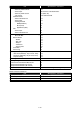
OB User Information Setting
Item Specifications / Comments
Display/Setting Method Browser
User Information Operation
・New Registration
yes (only for Admin.)
・Edit
yes (Admin can edit all users' data, but user can
edit only his own data.)
・Delete
yes (only for Admin.)
・Forced Delete
yes (only for Admin.)
・Import/Export
yes (only for Admin.)
・
CSV Format
yes
・
vCard Format
yes (Name/CompanyFax/E-mail)
Registered User List Display
・User Log-in Status Display
yes
・User's Unread Document Display
yes (New document arrival)
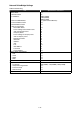
User Information Item
・User Name
30 characters
・User ID
no (no ID Setting)
・Password
20 characters
・Type (Gateway User)
no
・Company
50 characters
・Department Name (User Group Name)
100 characters
・TEL
40 digits
・Fax
40 digits
・E-mail Address
50 characters
Set to the Reply-To address or not
no
・Login Icon
yes
・LDAP Server Login
yes
・Personal Available Address
yes
・Shared/Personal Default Settings
yes
・IP Address of Client PC
yes
・PC Name
yes
・Administrator Authority
N/A
・List Print
no
・Home Directory
yes (Note: the box that has the new arrival docu-
ment is given the first priority)