
User Guide
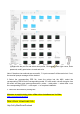

(2)Right-click the pos file and select show profile, Click on the lower right corner, Enter
password, modify permissions to read and write.
Note: if the above two methods are successful, "2. Input command" will be carried out. If not,
the terminal prompt message will be checked.
2. Select the corresponding PPD file, insert the printer into the MAC, select the
corresponding PPD file for the corresponding model: if it is 80 model, usb will recognize it as
80 model, and then open system preferences > printer - > add printer - > select other > use
the corresponding PPD file - > click repair - > to complete installation.
3. Select the document for printing test.
Welcome to watch training video of Mac driver installment on YouTube:
https://youtu.be/ZGr8kvyHLj0
Mac driver download link:
http://bit.ly/MacDriverDowload