
Technical data






UPS MTD-XL
Troubleshooting
MTD series
65
9. Troubleshooting
Only authorized trained personnel may perform troubleshooting tasks on
the UPS.
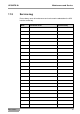
Fault
Cause
Measures
Alarm signal in
4 seconds intervals
The UPS is in battery
mode.
Check the mains power
supply input.
Alarm signal every
second and the mes-
sage "bATL" appears
on the display.
The battery voltage is
too low.
Save all data of the
appliances and switch
these of.
Charge the battery for
24 hours.
Alarm signal every
second and the mes-
sage "OVLD" appears
on the display.
Output is overloaded.
Check the appliances at
the output. Keep the
maximum load capacity
of the UPS in mind.
Continuous alarm and
red display.
UPS internal error.
Please contact your
dealer.
The UPS cannot be
turned on.
The fuse has been
triggered.
Please contact your
dealer.
The UPS is turned on
but the outputs are not
working.
The appliances are not
connected correctly.
Check the connections
of the appliances.
The segment group of
the UPS output is deac-
tivated.
Activate the segment
group ( 7.14 Configu-
ration of UPS out-
puts).
The backup times are
too short.
The battery is empty
Charge the battery for
24 hours.
The battery is faulty.
Replace the faulty
battery module.
The buttons do not
respond.
The settings are wrong.
Check the settings.
The button is defective.
Please contact your
dealer.