
Technical data




UPS MTD-XL
UPS Device Description
MTD series
35
3.3 Device Modification
The UPS can be set up in different ways:
– vertical as a tower device on supporting feet
– horizontal mounting in a 19" rack.
Depending on the way of positioning, the LCD-Display has to be rotated and
the assembly brackets have to be mounted for the 19"-slot.
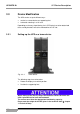
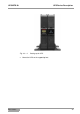
3.3.1 Setting up the UPS as a tower device
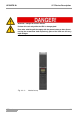
Fig. 3-3 - 1 Tower device
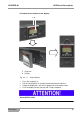
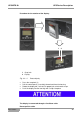
The following steps have to be taken:
Rotate the display to a vertical position.
Position the supporting feet.
When setting up the device, keep in mind that the surface on which the
UPS is placed must be level and horizontal.
The surface must have the appropriate load-bearing capacity.
Please note the weight of the UPS given in the technical data ( chapter
11 Technical Data).