
Instruction manual




MTD 4000 Instruction Manual — Rev.M_11/19/14
29
Section 7—Maintenance and
Troubleshooting
7.1 Cleaning the MTD 4000
1. The MTD 4000 can be wiped off with a damp cloth. The power cord should be disconnected from the
unit before this is done. In the case of stubborn dirt a gentle household cleaner can be sprayed on the
cloth and then wiped on the unit. If this method is used, remove any cleaner residue with a damp cloth.
Do not spray cleaner onto the unit.
2. Do not use any cleaning agents containing high contents of phenol derivates, alcohol, compounds of
chlorine or peracetic acid. It is recommended to use aldehyde-based disinfectants. The device is not
suited for heat sterilization or for sterilization with gases.
3. Follow the manufacturer’s instructions for cleaning all harnesses and treatment table surfaces after use
on each patient.
7.2 Routine Maintenance
1. To assure accurate performance of the MTD 4000, calibration should be performed on an annual basis
by a qualified biomedical technician.
2. Standard medical electrical safety checks should be performed annually by qualified biomedical
engineers or technicians trained to perform these procedures.
3. Inspect the traction rope for wear. It should be replaced if signs of wear are noticed.
4. The manual calibration indicated in the instruction manual should be performed routinely.
5. Annually, the auto-calibration should be performed by a qualified biomedical technician.
6. Replace the traction rope every two years. This service should be performed by a qualified biomedical
technician.
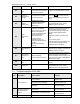
7.3 Error Codes
Error Code Description Cause of Error Solution
*E-1*
Calibration
data error
The saved calibration data
is wrong; or the position of
limit switch is not adjusted.
*This error detection is for factory use
only. If it happens during the operation,
please contact Mettler Electronics for
repair.
E-2
Clutch Starting
error
The clutch module is worn
or broken.
The motor control board is
broken.
Restart the system to remove the error.
If the error still occurs, please contact
Mettler Electronics for repair.
E-3
Clutch closing
error
The clutch module is worn
or broken.
Restart the system to remove the error.
If the error still occurs, please contact
Mettler Electronics for repair.
E-4
The patient
safety switch
has been
pressed.
The Patient Stop Switch is
being pressed,
disconnected, unplugged,
or broken.
Press the STOP button to remove the
error code and check the cable
connection.
If the error still occurs, replace it with
the new one. If the new emergency
cable does not resolve the problem and
error is still occurring, send back to
Mettler Electronics for repair.
E-5
Overload
detection
The pull force reached
safety limit.
Restart the system to remove the error.
If the error still occurs, please contact
Mettler Electronics for repair.
*E-6*
Force meter
Communication
error
The digital force meter is
not connected to the
traction unit during auto-
*This error detection is for factory use
only. If it happens during the operation,
please contact Mettler Electronics for