
Instruction manual




Mettler Electronics Corp. — Rev.M_11/19/14
28
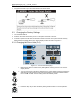
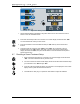
6.6 Saving a Treatment Setup
Figure 6.3—Saving a Treatment Setup
1. Set the desired treatment parameters using either section 6.2 for the continuous mode or
section 6.3 for the intermittent mode.
2. Press and hold the stop button for 3 seconds. The “Actual” display window will show “SE0”.
You have entered the memory function mode.
3. Press the set button to save the treatment setup to “SE0” memory and to exit the save
function.
4. There are a total of 10 memory slots: “SE0” through “SE9”. As an example, to save a
treatment setup in the “SE8” position, after step 2, turn the control knob until the actual
display window shows “SE8”, then press the set button to save the treatment setup and to
exit the save function.
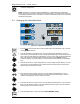
6.7 Recalling a Saved Treatment Setup
1. Press and hold the stop button for 3 seconds. The “Actual” display window will show
“SE0”. You have entered the memory function mode.
2. Turn the control knob until the actual display window shows whichever treatment setup
you would like to use, “SE0” through “SE9”.
3. Once the code for the treatment setup you would like to use is displayed in the “Actual”
display window, press the start button to select it.
4. The treatment is ready to go, so press the “Start” button to begin the treatment.