
Instruction manual




Mettler Electronics Corp. — Rev.M_11/19/14
24
5.2 Installation Notes
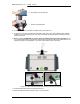
1. Only pull the traction rope in the correct direction as shown below.
5.3 Changing the Factory Settings
1. Turn the MTD 4000 off.
2. Hold the “Set” button down while you turn on the power at the rear of the unit.
3. Continue to press and hold down the set button at least 3 seconds. The system will enter “Factory
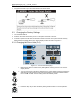
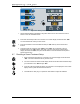
Setting Mode” and display “F–0” in the “Actual” display window as shown in Figure 5.3.
5.3.1 Changing the Force Units (F-0)
Figure 5.3— F-0 Controls and Displays
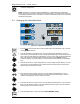
1. Make sure the device is under Factory Setting Mode, showing an “F-?” in the “Actual”
display window.
2. Turn the control knob until “F-0” is displayed in the “Actual” display window and press the
start button to select the “F-0” code. Press the set button to switch to a different traction
force unit “LB” or “KG”. The new setting will be automatically saved.
3. Press the “Stop” key to leave the factory setting mode and return to normal operation.