
Instruction manual




MTD 4000 Instruction Manual — Rev.M_11/19/14
21
Section 5—Installation
5.1 Installation Instructions
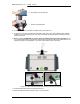
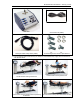
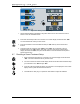
1. Attach the MTD 4000 to the table using the accompanying hardware supplied with the unit. (See Figure
5.1) Please note, lower right hand mounting hole requires short mounting screw. An example with step
by step instructions is shown below:
Figure 5.1—
Bottom View of the MTD 4000 Showing Placement of Mounting Holes
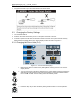
2. Center MTD 4000 on table platform.
3. The MTD4000 comes with 3 long bolts (3/4") and 1 short bolt (3/8") for
installation. Please follow the instruction to install the “short bolt” on the
hole with RED arrow. Using the long bolt on this hole may damage
internal components. Position bolts using the bolts provided with the MTD
4000.
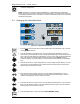
4. Tighten bolts with ½ in wrench or socket.
5. Loosen platform slide retainer bolt.