
Instruction manual




MTD 4000 Instruction Manual — Rev.M_11/19/14
19
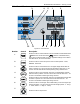
4.5 Control Panel
12543
12 11 9 6 7 10 8 13
Figure 4.5—Control Panel
Number Control Description
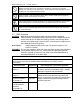
1
Press this button to switch between Continuous Mode and Intermittent Mode.
(
stands for Continuous Mode; stands for Intermittent Mode.)
When using Continuous Mode, some non-applicable settings such as HOLD
and REST times, will not be illuminated.
2
Press this button to set traction speed. There are three speeds – FAST,
NORMAL, and SLOW.
3
Press this button to set treatment time. The digital display flashes after the
button is pressed. Turn the control knob to set treatment time from 1 to 99
minutes. The left LED indicator will keep flashing during treatment time.
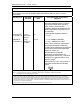
4
Press this button to set pull strength hold time. The digital display will flash
after the button is pressed. Turn the control knob to set hold time from 1 - 99
seconds. The left LED indicator lights during hold time.
5
Press this button to set pull strength rest time. The digital display flashes after
the button is pressed. Turn the control knob to set rest time from 1 - 99
seconds. The left LED indicator lights during rest time.
6
Press this button to set strength. Hold & Rest setting can be exchanged upon
pressing the button. Turn the control knob to set strength (HOLD:2 - 90 kg /
4 - 198 lb;REST:0 - 89kg / 0 - 195 lb).
7
Press this button to stop traction.