
User`s guide




27
FM Radio
The MEGA VIEW 561 has a built-in FM Radio function.
Search a FM Station
1. Fist of all, plug earphones to earphone jack. The earphones are also used as
antenna for MEGA VIEW 561. “Plug in Earphone!” message will appear
on LCD display if you do not plug it in. Radio quality might vary from
regions and angles. Disconnecting earphones might cause radio noise.
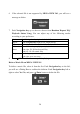
2. Push Navigation key up or down to select FM Radio as Figure 7, and then
press
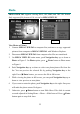
/Enter button. The display will show as Figure 8.
3. You can see 8 default stations showing on display. Press
/Enter button to
select Frequency Bar to search a different radio station.
4. Press /Enter button to select Scan or Fine Tune. When Scan is selected,
by pushing Navigation key to the right or left, an available station will be
found. If Fine Tune is selected, frequency bar will be adjusted by 0.1 MHz
on each Navigation key move.
5. On searching, you can see frequency showing on display.
Figure 7 Figure 8