
Computer Computer Hardware User Manual


3-23
BIOS Setup
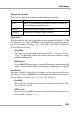
Floopy Disk Controller
This is used to enable or disable the onboard Floppy controller.
Serial Port 1
This item specifies the base I/O port address of the onboard Serial Port 1 (COM
A). Selecting Auto allows AMIBIOS to automatically determine the correct
base I/O port address. Settings: Auto, 3F8/COM1, 2F8/COM2, 3E8/COM3,
2E8/COM4 and Disabled.
Port2 Mode
This item sets the operation mode for Serial Port 2. Settings: Normal,
1.6 uS, 3/16 Baud and ASKIR (the last three operation modes are setting
options for IR function).
IR Pin Select
Set to IRRX/IRTX when using an internal IR module connected to the IR
header. Set to SINB/SOUTB. when connecting an IR adapter to COM B.
Parallel Port
This field specifies the base I/O port address of the onboard parallel port.
Selecting Auto allows AMIBIOS to automatically determine the correct base
I/O port address. Settings: Auto, 378, 278, 3BC, Disabled.
Port Mode
This item selects the operation mode for the onboard parallel port: ECP,
Normal, Bi-Dir or EPP.
EPP Version
The item selects the EPP version used by the parallel port if the port is set
to EPP mode. Settings: 1.7, 1.9.
Option Description
Auto BIOS will automatically determine whether to enable the
onboard Floppy controller or not.
Enabled Enables the onboard Floppy controller.
Disabled Disables the onboard Floppy controller.