
User`s manual




Hardware Setup
MS-7640
Chapter 2
2-25
Hardware Setup
MS-7640
Chapter 2
Please refer to the table below to nstall the graphcs cards for CrossFreX
TM
mode.
1 graphcs card
(non-
CrossFreX
TM
)
2 graphcs cards
(CrossFreX
TM
mode )
3 graphcs cards
(CrossFreX
TM
mode )
4 graphcs cards
(CrossFreX
TM
mode )
PCI_E1 x16 @ x16 @ x16 @ x8 @ x8 @
PCI_E3 x0 x0 x0 x8 @ x8 @
PCI_E4 x4 x4 x4 x4 x4
PCI_E5 x16 x16 @ x8 @ x16 @ x8 @
PCI_E6 x0 x0 x8 @ x0 x8 @
@ : graphcs card nstalled slot
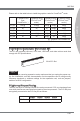
PCI (Perpheral Component Interconnect) Slot
The PCI slot supports LAN card, SCSI card, USB card, and other add-on cards that
comply wth PCI speccatons.
32-bt PCI Slot
Important
When addng or removng expanson cards, make sure that you unplug the power sup-
ply rst. Meanwhle, read the documentaton for the expanson card to congure any
necessary hardware or software settngs for the expanson card, such as jumpers,
swtches or BIOS conguraton.
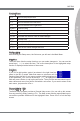
PCI Interrupt Request Routng
The IRQ, acronym of nterrupt request lne and pronounced I-R-Q, are hardware lnes
over whch devces can send nterrupt sgnals to the mcroprocessor. The PCI IRQ pns
are typcally connected to the PCI bus pns as follows:
Order1 Order2 Order3 Order4
PCI Slot1 INT E# INT F# INT G# INT H#