
Remote Control Manual



Table Of Contents
- mrcool-diy-II-remote-manual-Fcover
- mrcool-diy-II-remote-manual-P01
- mrcool-diy-II-remote-manual-P02
- mrcool-diy-II-remote-manual-P03
- mrcool-diy-II-remote-manual-P04
- mrcool-diy-II-remote-manual-P05
- mrcool-diy-II-remote-manual-P06
- mrcool-diy-II-remote-manual-P07
- mrcool-diy-II-remote-manual-P08
- mrcool-diy-II-remote-manual-P09
- mrcool-diy-II-remote-manual-P10
- mrcool-diy-II-remote-manual-P11
- mrcool-diy-II-remote-manual-P12
- mrcool-diy-II-remote-manual-Bcover
4
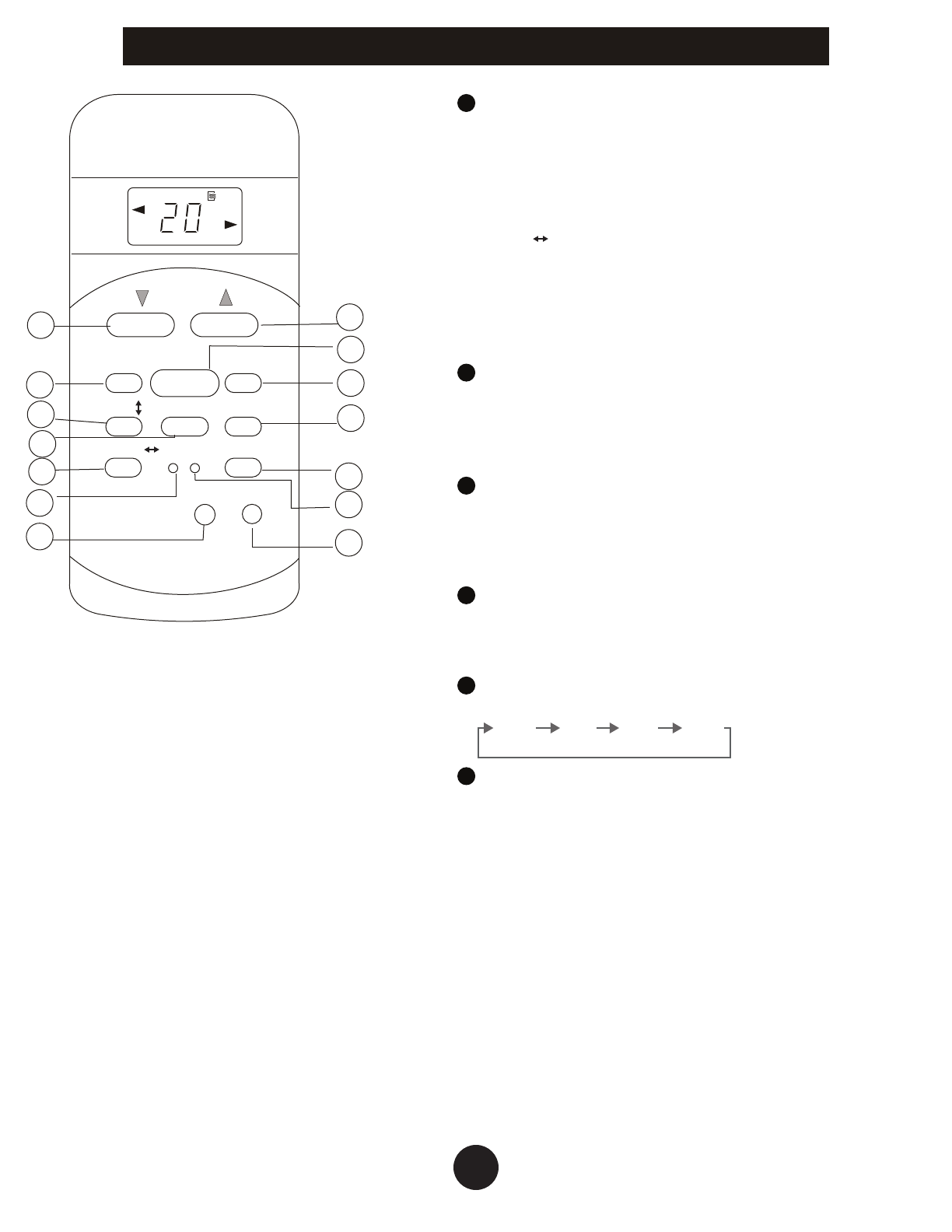
CLEAN AIR Button (applicable to RG51F3)
Disable/Active clean air function. When the clean
air function is initiated, the Ionizer/Plasma Dust
Collector (depending on models) is energized and
will help to remove pollen and impurities from the
air.
Swing Button (applicable to RG51F1)
Used to stop or start vertical louver movement and
set the desired left/right air flow direction. The
vertical louver changes 6 degree in angle for each
press.
RESET Button
Once the recessed RESET button is pressed, all of
the current settings will be cancelled and the
control will return to the initial settings.
LED Button
Disable/Active indoor screen display. When
pushing the button, the indoor screen display is
cleared, press it again to light the display.
ON/OFF Button
Operation starts when this button is pressed and
stops when the button is pressed again.
FAN SPEED Button
Used to select the fan speed in four steps:
Auto Low Med High
TIMER ON Button
Press this button to initiate the auto-on time
sequence. Each press will increase the auto-timed
setting in 30 minutes increments. When the setting
time displays 10.0, each press will increase the
autotimed setting 60 minutes increments. To
cancel the auto-timed program, simply adjust the
auto-on time to 0.0.
TEMP
AUTO
COOL
DRY
HEAT
FAN
HIGH
MED
LOW
MODE
FAN SPEED
TIMER ON
ECO
ON/OFF
TIMER OFF
RESET LOC K
1
2
4
5
6
7
8
3
10
9
11
12
13
14
O
SET TEMPERATURE ( F)
SWING
LED
DISPLAY
CLEAN
/
AIR
TURBO
SWING
Model: RG51F3/EU1 and
RG51F/EU1(This model does not
have clean air button
6
7
8
10
11
9
Operation of Buttons
For more details visit www.MrCool.com