
User`s manual



CP-134U Series User’s Manual Hardwareware Installation
2-2
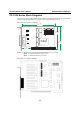
CP-134U Series Block Diagrams
CP-134U Series boards’ IRQ number and I/O address are assigned automatically by the PCI BIOS.
This means that the board MUST be plugged in first before installing the driver.
CP-134U-I V2 (120 x 115 mm)
120 mm
[4.7 2 i n]
11 5 m m
[4.5 2 i n]
41. 7 m m
[1.6 4 i n]
4 WIRE RS422
MU860
CP-134U- V2I
135 mm
[5.3 1 i n]
Port1
Port2
JP4
JP3
Port3
Port4
JP2
JP1
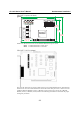
NOTE: Use JP1/2/3/4 to activate the Termination Resistors for ports 1/2/3/4.
Open Termination Resistor is NOT active
Short Termination Resistor is ACTIVE
CP-134U-I V1 (160 x120mm)