
User`s manual



4
4
Chapter 4 Serial Programming Tools
Moxa supports a class of easy to use, yet powerful serial programming libraries and
communication troubleshooting utilities under Windows NT/2000/XP/2003 and Windows 95/98.
Use these MOXA Serial Programming Tools to decrease your software development time.
In the following sections, we describe the installation of the library, and the utilities supported for
various programming platforms.
PComm, a professional serial comm tool for PCs, is a software package that runs under Windows
NT/2000/XP/2003 and Windows 95/98. PComm provides:
y A powerful serial communication library for easy programming in the most popular
programming languages. The serial communication library is useful for developing
applications for data communications, remote access, data acquisition, and industrial control
under Windows NT/2000/XP/2003 or Windows 95/98. It is a simpler solution compared to the
more complex Windows Win32 COMM API.
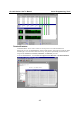
y Useful utilities such as diagnostic, monitor, and terminal emulator.
y Illustrative sample programs.
y Comprehensive on-line documentation.
PComm Installation
To install PComm, run \Setup.exe from the diskette. Note that the PComm diagnostic and monitor
utilities are for MOXA boards only. MOXA Windows 95/98/NT/2000/XP/2003 device drivers, as
well as MOXA boards are required. The drivers are installed separately, with details given in the
“Software Installation” chapter.
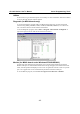
After PComm is successfully installed, click on Start, select Program Files, and then PComm
Lite group to select a list of utilities and documents.
PComm Programming Library
The serial communication library assists you in developing serial communications programs for
any COM port that complies with Microsoft Win32 API. It facilitates the implementation of
multi-process and multi-thread serial communication programs and substantially reduces
development time.
This serial communication library provides a complete function library and sample programs for
Visual C++, Visual Basic, and Borland Delphi. To view detailed function descriptions and sample
programs, click on Start Æ Program Æ PComm Lite Æ PComm Lib Help, PComm Porting
Notes or PComm Programming Guide, or refer to the sample programs in the PComm directory.