
User`s manual





CP-134U Series User’s Manual Software Installation
3-33
DOS
MOXA DOS API-232 is a software package that assists users in developing and/or debugging
serial communication programs. This section describes how to install the package, how to set up
the driver, and how to load or unload the driver.
The DOS driver for MOXA’s multiport serial boards supports the following products:
y Universal PCI Boards: CP-168U, CP-104UL, CP-104JU, CP-134U, CP-134U-I, CP-132UL,
CP-132UL-I V2(CP-132U-I V1)
y PCI Boards: C168H/PCI, C104H/PCI, C104HS/PCI, CP-114, CP-114I, CP-114S, CP-114IS,
CP-132, CP-132I, CP-132S, CP-132IS
y ISA Boards: C168H, C168HS, C168P, C104H, C104HS, C104P, CI-104J, CI-104JS, CI-134,
CI-134I, CI-134IS, CI-132, CI-132I, CI-132IS
y cPCI Boards: CT-114I
The following Steps use CP-134U to illustrate.
Installing the Driver
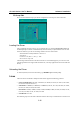
1. Run the installation program, DOSINST.EXE under \Software\DOS on the software CD.
Specify the target API-232 directory (e.g. C:\MOXA) where the software driver will be
copied. Press F2 to start the installation.