
User`s manual





CP-134U Series User’s Manual Software Installation
3-31
In this section, we explain how to configure another MOXA CP-168U board that is already
installed. Up to four CP-168U boards can be installed in one system under Windows NT, provided
sufficient system resources are available.
In addition to the procedures listed below, you may also click on Start Æ Program Æ MOXA
Utility Æ MOXA Smartio/Industio Configuration Panel Æ Add, and then refer to the
instructions from the previous section, “Installing the Driver.”
1. Open the Control Panel, click on the Network icon, and select the Adapters tab.
2. Click on MOXA Smartio/Industio Family Adapter from the Network Adapters list.
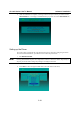
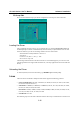
3. Click on the Properties button to open the Moxa Smartio/Industio Configuration Panel
window.
4. Next, refer to the instructions from the “First Time Driver Installation” subsection.
Removing an Existing CP-168U Board Configuration
First shut down your PC, and then physically remove the CP-168U board from the PCI or PCI-X
slot. The next time you start up the PC, the system will automatically remove the configuration.
There is no need to click the Remove button in the Moxa Smartio/Industio Configuration Panel
window.