
User`s manual



CP-134U Series User’s Manual Software Installation
3-26
Removing the Driver
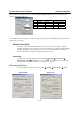
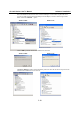
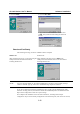
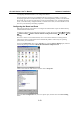
To remove the CP-168U board driver, open the Control Panel, double click on the Add/Remove
Programs icon, and then select the Install/Uninstall tab. Click on the MOXA Smartio/Industio
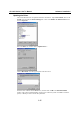
Driver option and then click on Add/Remove to start the driver removal process.
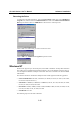
Click on Yes on to confirm that you want to remove the driver.
Click on OK in the Add/Remove Programs Properties window.
Windows NT
Windows NT supports up to 256 serial ports, from COM1 to COM256. To fully utilize Windows
NT’s multi-process and multi-thread advanced features, pure 32-bit Windows NT device drivers
were developed for MOXA’s multiport serial boards. The drivers conform to the Win32 COMM
API standard.
The Windows NT driver for MOXA’s multiport serial boards supports the following products:
y Universal PCI Boards: CP-168U, CP-104UL, CP-104JU, CP-134U, CP-134U-I, CP-132UL,
CP-132UL-I V2(CP-132U-I V1)
y PCI Boards: C168H/PCI, C104H/PCI, C104HS/PCI, CP-114, CP-114I, CP-114S, CP-114IS,
CP-132, CP-132I, CP-132S, CP-132IS
y ISA Boards: C168H, C168HS, C168P, C104H, C104HS, C104P, CI-104J, CI-104JS, CI-134,
CI-134I, CI-134IS, CI-132, CI-132I, CI-132IS
y cPCI Boards: CT-114I
The following steps use CP-168U to illustrate.