
User`s manual



CP-134U Series User’s Manual Software Installation
3-24
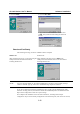
Check the Auto Enumerating COM Name check-box to assign continuous COM numbers for
subsequent ports. For example, if COM3 is assigned to Port 1, then COM4 will be automatically
assigned to Port 2.
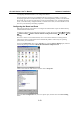
Select an Rx FIFO Trigger from the Rx FIFO Level pull-down list. Rx FIFO trigger levels from
High to Low are available, with the default set to High (120 bytes). Check Set the change to all
ports check-box to apply the just defined Rx FIFO Trigger to all ports.
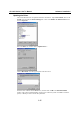
Select a Tx FIFO Size from the Tx FIFO Level pull-down list. Tx FIFO Levels from High to Low
are available, with the default set to High (128 bytes). Check Set the change to all ports
check-box to apply the just defined Tx FIFO Size to all ports.
CP-134U V2/CP-134U-I V2 CP-134U/CP-134U-I
Tx FIFO Rx FIFO Tx
FIFO
Rx FIFO
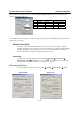
High 128 120 64 56
Middle 64 60 32 28
Low 1 1 1 1
Unit: Bytes
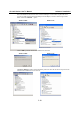
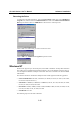
To complete the update, click OK in the Port X window, click OK in the CP-168U board
Properties window, and then click [OK] on the Device Manager tab. Restart the system to
activate the latest configuration.