
User`s manual



CP-134U Series User’s Manual Software Installation
3-20
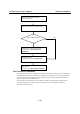
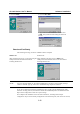
Install the PCI or Universal PCI
board in the system
Start Windows 95/98 to detect the board
Driver installed before? Yes
No
Install the driver from the driver CD.
See the section, “First Time Driver
Installation”
Configure the port.
See the section, “Port Configuration”
The CP-168U board’s portsshould be
ready to work.
See the section, “Board and Ports Ready”
First Time Driver Installation
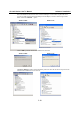
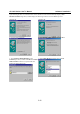
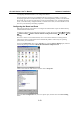
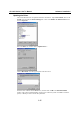
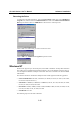
This stage gives the steps for installing the CP-168U board driver for the first time. To account for
the slight difference between installing under Windows 95 and Windows 98, a separate column is
used for each of the two operating systems. Follow the steps in the left column for Windows 95,
and in the right column for Windows 98.
If a CP-168U board has already been installed, and another CP-168U board is plugged in, the
system will prompt you to skip this stage, and go directly to Port Configuration, which is
discussed in the next section.