
User`s manual



CP-134U Series User’s Manual Software Installation
3-19
Windows 95/98
The Windows 95/98 driver supports up to 128 serial ports, from COM1 to COM128. To fully
utilize the advanced multi-process and multi-thread features of Windows 95/98, pure 32-bit
Windows 95/98 virtual device port drivers (VxD) compliant with communication drivers
(VCOMM) have been developed for the CP-168U and other MOXA multiport boards. The drivers
conform to the Win32 COMM API standard.
The Windows 95/98 driver for MOXA’s multiport serial boards supports the following products:
y Universal PCI Boards: CP-168U, CP-104UL, CP-104JU, CP-134U, CP-134U-I, CP-132UL,
CP-132UL-I V2(CP-132U-I V1)
y PCI Boards: C168H/PCI, C104H/PCI, C104HS/PCI, CP-114, CP-114I, CP-114S, CP-114IS,
CP-132, CP-132I, CP-132S, CP-132IS
y ISA Boards: C168H, C168HS, C168P, C104H, C104HS, C104P, CI-104J, CI-104JS, CI-134,
CI-134I, CI-134IS, CI-132, CI-132I, CI-132IS
y cPCI Boards: CT-114I
The following steps use CP-168U to illustrate.
Installing the Driver
The plug-n-play capability of Windows 95/98 allows you to plug the CP-168U board into an
available PCI slot, and then get to work right away with very little installation effort. Windows
95/98 automatically detects the presence of the new board, and prompts you to install the driver.
You just need to have the driver CD available to complete the installation process.
A maximum of 4 CP-168U boards can be installed in one system, provided sufficient I/O address
and IRQ number resources are available.
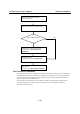
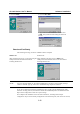
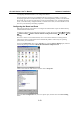
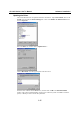
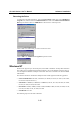
The following flow chart illustrates the driver installation stages of CP-168U boards.