
User`s manual



CP-134U Series User’s Manual Software Installation
3-17
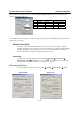
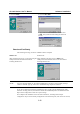
with the default set to High (128 bytes). Check the Set the change to all ports check-box to apply the just
defined Tx FIFO Size to all ports.
CP-134U V2/CP-134U-I V2 CP-134U/CP-134U-I
Tx FIFO Rx FIFO Tx FIFO Rx FIFO
High 128 120 64 56
Middle 64 60 32 28
Low 1 1 1 1
Unit: Bytes
Click on OK in the Port X window to confirm the port settings, and then click on OK in the Property window to
complete the port settings.
MOXA PComm Utility
This utility, which comes with MOXA PComm Lite, provides a convenient way to diagnose
problems with Moxa boards, and provides internal and external testing of IRQ, TxD/RxD, UART,
CTS/RTS, DTR/DSR, etc. The program can be used to verify that the hardware and software
related to Moxa boards and ports are installed and running correctly.
Event Log
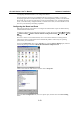
To check the Event Log for MOXA boards, click Start Æ Settings Æ Control Panel Æ
Administrative Tools Æ Event Viewer, to enter the Event Viewer program. You may find the
latest information relevant to the Moxa driver in the system category.
Removing the Driver
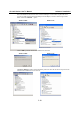
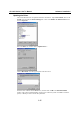
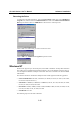
You can uninstall the board by first selecting Start Æ Settings Æ Control Panel Æ System.
Windows 2000 Windows XP