
User`s manual



CP-134U Series User’s Manual Software Installation
3-16
Port Configuration
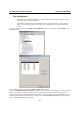
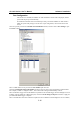
After the driver is installed, the MOXA CP-168U Installation window will be displayed, and the
system will map the ports automatically.
If one MOXA CP-168U board was installed previously, and another MOXA CP-168U board is
added, the system will prompt you to take care of port configuration, which is discussed in this
section.
Click on a specific port from the CP-168U Series Installation window, and then click on Port Setting to open
the Port X window.
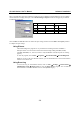
Select a COM number for the port from the Port Number pull-down list.
Check the Auto Enumerating COM Number check-box to force ports to map sequentially to COM numbers.
For example, if COM 3 is assigned to Port 1, then COM 4 will be assigned automatically to Port 2.
Select an Rx FIFO Trigger from the Rx FIFO Level pull-down list. Rx FIFO trigger levels from High to Low are
available, with the default set to High (120 bytes). Check the Set the change to all ports check-box to apply the
just defined Rx FIFO Trigger to all ports.
Select a Tx FIFO Size from the Tx FIFO Level pull-down list. Tx FIFO Levels from High to Low are available,