
User`s manual



CP-134U Series User’s Manual Software Installation
3-10
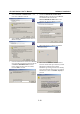
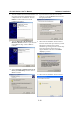
3. Select Search for a suitable driver… and
then click on Next to continue.
4. Select Specify a location and then click on
Next to continue.
5. Insert the Moxa Driver CD into the CD-ROM
drive, and then specify the location of the file
as Software\Win2K-XP-2003 as shown
below (change the drive letter if needed).
Click on OK to continue.
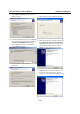
3. Checkmark Include this location in the
search checkbox, and then click on Browse.
You should be able to locate the
Software\Win2K-XP-2003 folder on the
software CD. Click on Next to continue.
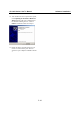
4. Wait while the driver software is installed.
5. Wait while the installation wizard searches.
The next window that opens cautions you that
although this software hasn’t passed
Windows Logo testing, the driver has already
been tested and was shown that it can support
Windows OS. Click on Continue Anyway to
proceed.