
User`s manual



CP-134U Series User’s Manual Software Installation
3-9
Windows 2000/XP
Windows 2000/XP supports up to 256 serial ports, from COM1 to COM256. To fully utilize
Windows 2000/XP’s multi-process and multi-thread advanced features, pure 32-bit Windows
2000/XP device drivers were developed for MOXA multiport boards. The drivers conform to the
Win32 COMM API standard.
The Windows 2000/XP driver for MOXA’s multiport serial boards supports the following
products:
y Universal PCI Boards: CP-168U, CP-104UL, CP-104JU, CP-134U, CP-134U-I, CP-132UL,
CP-132UL-I V2(CP-132U-I V1)
y PCI Boards: C168H/PCI, C104H/PCI, C104HS/PCI, CP-114, CP-114I, CP-114S, CP-114IS,
CP-132, CP-132I, CP-132S, CP-132IS
y ISA Boards: C168H, C168HS, C168P, C104H, C104HS, C104P, CI-104J, CI-104JS, CI-134,
CI-134I, CI-134IS, CI-132, CI-132I, CI-132IS
y cPCI Boards: CT-114I
The following steps use CP-168U to illustrate.
Installing the Driver
The following procedure describes how to install the CP-168U driver for the first time under
Windows 2000 and Windows XP. First make sure the board or boards have already been plugged
into the system’s PCI or PCI-X slot(s).
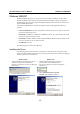
Windows 2000 Windows XP
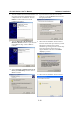
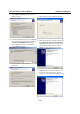
1. Windows 2000 can auto-detect new devices,
and activate the Found New Hardware
function to install a device driver for Plug and
Play devices.
2. Click on Next to continue.
1. Windows XP can auto-detect new devices,
and activate the Found New Hardware
function to install a device driver for Plug and
Play devices.
2. Select Install from a list or specific
location, click on Next to continue.