
User`s manual


CP-134U Series User’s Manual Software Installation
3-2
Windows 2003
This section describes how to install the Windows 2003 driver for PCI/Universal PCI boards. The
driver conforms to the Win32 COMM API standard.
The Windows 2003 driver for MOXA’s multiport serial boards supports the following products:
y Universal PCI Boards: CP-168U, CP-104UL, CP-104JU, CP-134U, CP-134U-I, CP-132UL,
CP-132UL-I V2(CP-132U-I V1)
y PCI Boards: C168H/PCI, C104H/PCI, C104HS/PCI, CP-114, CP-114I, CP-114S, CP-114IS,
CP-132, CP-132I, CP-132S, CP-132IS
y ISA Boards: C168H, C168HS, C168P, C104H, C104HS, C104P, CI-104J, CI-104JS, CI-134,
CI-134I, CI-134IS, CI-132, CI-132I, CI-132IS
y cPCI Boards: CT-114I
The following steps use CP-168U to illustrate.
Installing the Driver
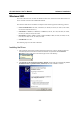
1. After installing the PCI/Universal PCI board and powering on your PC, Windows 2003 will
automatically detect the PCI/Universal PCI board that was just added. The Found New
Hardware window will open in the bottom right corner of the desktop.
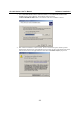
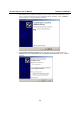
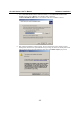
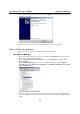
2. The Welcome to the Found New Hardware Wizard window will open automatically. Select
Install from a list or specific location (Advanced) and click on Next to continue.