
User`s manual


CP-134U Series User’s Manual Hardwareware Installation
2-4
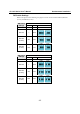
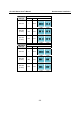
Jumper Settings
The two on-board 30-pin jumpers are used to select between the RS-232 and RS-422/485 serial
interfaces. If you select RS-422/485, then you will also need to set the DIP Switches to select
between RS-422, RS-485 (4-wire), and RS-485 (2-wire). Note that the two ports can be configured
independently.
RS422
RS232
Port2
RS485
RS422
RS232
Port1
RS485
Port1
Port2
Port1
Port2
Jumper pins:
Top for Port 1,
Bottom for Port 2
RS-422/485:
Plug in the jumper so that
it covers the left two columns of
pins to select the RS-422/485
option.
RS-232:
Plug in the jumper so that
it covers the right two columns
of pins to select the RS-232
option.