
User`s manual



PCI Express Board User’s Manual Software Installation
3-11
Configuring the Ports
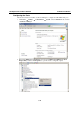
After the driver has been installed, use Device Manager to configure the CP-114EL serial ports.
1. Click Start → Settings → Control Panel → System, select the Hardware tab, and then
click Device Manager.
2. Expand the Multi-port serial adapters tab, right click MOXA CP-114EL Series (PCI
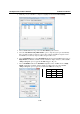
Express Bus), and then click Properties to open the board’s configuration panel.