
User guide




98
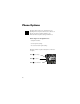
Getting to Display Options...
1.
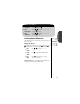
Enter Menu Press ƒ then press aa
aa
.
2.
Enter
Phone Options
Press qq
qq
or ZZ
ZZ
to scroll to Phone Options
and press
aa
aa
to select.
3.
Enter
Display Options
Press qq
qq
or ZZ
ZZ
to scroll to Display Options
and press
aa
aa
to enter.
Display Options Submenu
Customizing the Backlight
Your phone’s backlight illuminates when you open the phone,
press a key, or receive an incoming call signal. This feature
allows you to choose how long it remains ON.
Keep in mind: The backlight will always be illuminated when
your phone is connected to an external power supply, like a
charger or vehicle accessory.
4.
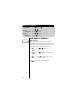
Find
Feature
Press qq
qq
or ZZ
ZZ
to scroll to Backlight
Selection and press
AA
AA
to select.
5.
Toggle
Feature
Press qq
qq
or ZZ
ZZ
to scroll to 15 Seconds, 30
Seconds, or Always On and press
AA
AA
to
select the displayed option.
6.
Exit
Menu
Press º to exit the menu, or you may
scroll to other features.
Backlight
Selection
P