
User guide




94
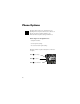
1.
Enter Menu Press ƒ then press aa
aa
.
2.
Enter
Phone Options
Press qq
qq
or ZZ
ZZ
to scroll to Phone Options
and press
aa
aa
to select.
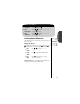
3.
Enter
Call Options
Press qq
qq
or ZZ
ZZ
to scroll to Phone Options
and press
aa
aa
to select.
Getting to Call Options...
Call Options Submenu
Open to Answer
This feature allows you to set whether or not your phone
automatically answers when opened. If you utilize Caller ID, you
will probably want to set this feature OFF so you can open the
phone and check who is calling before you answer.
Note: To answer calls with Open to Answer OFF,
press
ª.
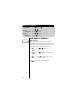
4.
Find
Feature
Press qq
qq
or ZZ
ZZ
to scroll to Open to
Answer.
5.
Toggle
Feature
Press AA
AA
to toggle the feature ON or OFF.
6.
Exit
Menu
Press º to exit the menu, or you may
scroll to other features.
Open to
Answer On
P