
User guide




93
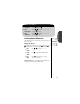
1.
Enter Menu Press ƒ then press aa
aa
.
2.
Enter
Phone Options
Press qq
qq
or ZZ
ZZ
to scroll to Phone Options
and press
aa
aa
to select.
3.
Enter
Call Options
Press qq
qq
or ZZ
ZZ
to scroll to Call Options
and press
aa
aa
to enter.
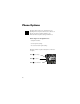
Getting to Call Options...
Phone Options
Call Options Submenu
This submenu gives you control over the way your phone places
and receives calls.
Multiple Key Answer
With Multiple Key Answer ON, you can answer calls by pressing
AA
AA
or any key in the center of the keypad, ⁄ through ».
Keep in mind: If there are any digits in your Scratchpad or if
your phone is locked, this feature will not work.
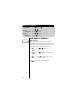
4.
Find
Feature
Press qq
qq
or ZZ
ZZ
to scroll to Multi Key
Answer.
5.
Toggle
Feature
Press AA
AA
to toggle the feature ON or OFF.
6.
Exit
Menu
Press º to exit the menu, or you may
scroll to other features.
Call
Options
P
Multi Key
Answer Off
P