
Specifications



91
Phone Options
90
Your phone is messaging ready. If you subscribe to messag-
ing services through your Service Provider, you can receive
Caller ID, Voice Mail Notification and pager-like alphanu-
meric messages.*
In this section you will learn how to:
view your messages
delete one or all of your messages
set reminder tones to remind you of unread messages
*Contact your Service Provider for availability.
Using Messaging
Easier still, turn Auto Answer ON to have your phone auto-
matically answer incoming calls after two rings.
You will see:
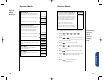
1. Press then press
to enter the
Menu Features.
2. Press to scroll to Auto-
matic Answer.
3. Press to toggle the feature ON or OFF.
4. Press to exit the menu, or you may
scroll to other features.
Automatic
Answer
Shortcut
Press then
press the Smart
Button, then
,
and continue
with step 3.
Tip: If the ringer
and VibraCall
functions are OFF,
your phone will
answer without
ringing or vibrating.
Call Options Sub-Menu
Auto
AnsrOff
Auto
Ansr On
or
StarTac.prt 3/7/00 9:46 Page 90