
Specifications




73
Lock/Security
72
The Secure Options sub-menu contains a number of
security-minded features to put your mind at ease. For your
protection, you must enter the six-digit security code in order
to access these features. The factory programmed lock code
used to unlock the phone is 123 and the six-digit security code
is 000000. These may have been changed at the time your
phone was activated. If you need to refresh your memory,
this feature displays the currently active three-digit lock code.
You will see:
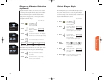
1. Press , and your six-digit security
code.
2. Press to display your
three-digit lock
code. It appears for a few seconds.
3. Press to exit the menu, or you may
scroll to other features.
If you would like to change your three-digit lock code, this
feature is for you!
You will see:
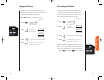
1. Press , your six-digit security code,
the new 3-digit unlock code,
and .
2. Enter code Enter the new
three-digit code.
It is displayed for a few seconds.
Changed
To XXX
View Lock
Code
Change
Lock Code
Secure Options Sub-Menu
LocCode
XXX
When Priority Call is activated on your cellular phone you
can use this feature to call an important number you have
stored in memory location 01 even if the phone is locked. At
any time if you dial 911 or an emergency number previously
stored by your cellular service provider, the display will read
“Dialing Emergency.” If the unit is locked and you press and
hold the number 1 or enter an emergency number, the
phone will still display “Locked” but will place the emer-
gency call. If you have stored an alternate non-emergency
number in memory location 01, and you press and hold the
number 1, the phone will display “Priorty Call.” Please keep
in mind:
Your emergency or priority number must be stored in
memory location 01 to be able to place a call when the
unit is locked. Be careful not to overwrite the number
stored in this location.
Some cellular systems have their own emergency num-
bers and do not allow access to numbers such as 911.
Check with your cellular service provider for details about
emergency calling in your area.
You will see:
1. Press then press
to enter the
menu features.
2. Press to scroll to
Priority Call.
3. Press to toggle the feature ON or OFF.
4. Press to exit the menu, or you may
scroll to other features.
Shortcut
Press then
press the Smart
Button, then
,
and continue
with step 3.
Priority Call
Priorty
CallOff
Priorty
Call On
or
StarTac.prt 3/7/00 9:46 Page 72