
Specifications




71
Lock/Security
70
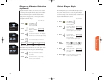
You can lock your phone manually at any time to help pre-
vent unwanted use. Once locked, you can leave your phone
ON or turn it OFF and the phone remains locked.
1. Press
You will see:
2. Press for at least one
& hold full second.
“LOCK” is printed on as a reminder.
3. Press or press
to lock your phone.
Unlocking you phone is quick and easy. Once your phone
is ON, just enter your three-digit lock code to unlock your
phone. (See page 73.)
You can still receive calls when the phone is locked. Follow
these steps to answer the incoming call.
1. Enter code Enter your three-digit lock code.
2. Press or press to receive the call.
Locking the
Phone
Unlocking
the Phone
Tip: If you have
forgotten your lock
code, try pressing
,,
or the last three
digits of your cellular
phone number.
Manual Electronic Lock
Lock ?
Locked
Automatic Electronic Lock
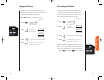
When you turn this feature ON, your phone will automati-
cally lock itself each time the phone is turned OFF.
You will see:
1. Press then press
to enter the
menu features.
2. Press to scroll to
Automatic Lock.
3. Press to toggle the feature ON or OFF.
4. Press to exit the menu, or you may
scroll to other features.
Shortcut
Press then
press the Smart
Button, then
,
and continue
with step 3.
Auto
LockOff
Auto
Lock On
or
StarTac.prt 3/7/00 9:46 Page 70