
Specifications




66 67
Tone Controls
Shortcut
Press then
press the Smart
Button, then
,
and continue
with step 3.
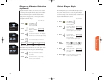
Scratchpad tones are the tones that your phone sends to
access automated calling systems like Voice Mail. If you
don’t want your party to hear these sounds when you use
the Scratchpad, turn the Scratchpad tones OFF.
You will see:
1. Press then press
to enter the
menu features.
2. Press to scroll to
Scratchpad Tones.
3. Press to toggle the feature ON or OFF.
4. Press to exit the menu, or you may
scroll to other features.
Note: If you turned the Scratchpad tones OFF, but you
want to access a tone-activated system like Voice Mail, place
your call, enter the numbers you need to transmit, then:
Press then press to send the tones.
Scratchpad Tones
Scrpad
Tone On
Scrpad
ToneOff
or
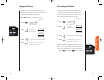
Keypad tones are the sounds you hear when you press any
key on the phone. If you want to be discreet, use this feature
to silence the audio feedback from the keypad.
Keep in Mind: The other party will still hear tones.
You will see:
1. Press then press
to enter the
menu features.
2. Press to scroll to
Keypad Tones.
3. Press to toggle the feature ON or OFF.
4. Press to exit the menu, or you may
scroll to other features.
Shortcut
Press then
press the Smart
Button, then
,
and continue
with step 3.
Keypad Tones
Keypad
Tone On
Keypad
ToneOff
or
StarTac.prt 3/7/00 9:46 Page 66