
Specifications


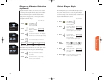


Shortcut
Press then
press the Smart
Button, then
,
and continue
with step 3.
61
Call Timers
Auto Display Timer
60
You can set this timer to beep during your calls at an interval
that you select—from 11-999 seconds. Like the One Minute
Audible Timer, you will hear the beep 10 seconds before the
end of each interval, and the party on the other end will not
hear the beeps.
You will see:
1. Press then press
to enter the
menu features.
2. Press to scroll to
Repeating Timer.
3. Press to toggle the
feature ON or OFF.
The prompt to enter seconds
will appear only if you have
turned the feature ON. If you
have turned it OFF, you will see:
then
4. Enter Enter the number
seconds of seconds you
would like between audible beeps.
5. Press to set the timer.
The phone will
confirm by displaying your entry.
6. Press to exit the menu, or you may
scroll to other features.
Repeating
Audible
Timer
(optional)
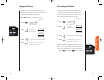
Shortcut
Press then
press the Smart
Button, then
,
and continue
with step 3.
Programmable Timers
Repeat
TimrOff
Repeat
Timr On
Enter
Seconds
or
Audible
TimrOff
Repeat
TimrOff
Beep At
XXXSecs
Set At
XXXSecs
Turn this feature ON to hear an audible beep 10 seconds
before the end of every minute during a call. Don’t worry,
the party on the other end will not hear the beeps.
You will see:
1. Press then press
to enter the
menu features.
2. Press to scroll to
One Minute
Timer.
3. Press to toggle the feature ON or OFF.
4. Press to exit the menu, or you may
scroll to other features.
One Minute Audible Timer
(optional)
One Min
TimrOff
One Min
Timr On
or
3. Press to toggle the feature ON or OFF.
4. Press to exit the menu, or you may
scroll to other features.
StarTac.prt 3/7/00 9:46 Page 60