
Specifications





Shortcut
Press then
press the Smart
Button, then
,
and continue
with step 3.
Tip: Activating the
Auto Display Timer
may reduce stand-
by-time or talk-time.
59
Call Timers
58
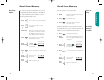
When you turn this feature ON, your phone will automatically
display your air-time in minutes (XX) and seconds (YY)
during and after each call.
You will see:
1. Press then press
to enter the
menu features.
2. Press to scroll to
Individual Timer.
Auto Display Timer
Indiv
TimrOff
Indiv
Timr On
or
You can track how much air-time you have accumulated
during any time period you choose. Use this feature to view
the time elapsed, and follow the instructions below
to reset the timer.
Press then three times for a quick
look at this timer.
Scroll over to this feature at the beginning of each billing
cycle and you will always be in the know. After you reset
the timer, it will continue to keep track of your air-time
(in minutes) until you reset it again.
Keep in Mind: The shortcuts will not work if the Reset
Timer is already set at zero.
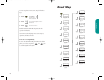
Press then , , to
reset
the timer.
Reset Timer
This is a non-resettable timer that keeps track of your phone’s
total air-time (in minutes).
Press then four times for a quick
look at this timer.
View Cumulative Timer
View Resettable Call Timer
Your phone’s Call Timer features give you a variety of options
for managing your time. You can monitor the length of indi-
vidual calls, set a timer to track monthly usage, or have the
phone alert you at intervals that you specify.
In this section you will learn how to:
monitor the length of your calls.
set and view the resettable timer for long-term monitoring.
program audible timers for your individual needs.
You can view the air-time of the most recent call or the call
in progress (in minutes and seconds) at any time using this
feature. The Individual Call Timer resets before you place
the next call and when you turn the phone OFF. You can also
choose to have the timer display automatically while calls are
in progress with the Automatic Display feature on page 59.
Press then twice for a quick look
at this timer.
View Individual Call Timer
Call Timers
StarTac.prt 3/7/00 9:46 Page 58