
Specifications





54 55
Features
Introducing the Menu Features
The StarTAC cellular phone is loaded with amazing features
that can help make life easier, more productive and just a
bit more exciting. The phone’s simple menu system will
help you find what you need quickly and easily.
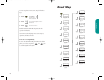
You can navigate through the menu system using the three
keys located on the left side of the phone. Use the upper and
lower volume keys to scroll and to control volume. Use the
middle Smart Button to choose menus and functions.
This manual uses these symbols to instruct you to use the
Smart Button and the upper and lower volume keys.
Press to scroll up
Press to select
Press to scroll down
The Menu
Shortcut
Experienced
Motorola Users:
Watch for the
“Shortcuts.” You
will find many of
the same key
sequences you
have used with
other Motorola
models!
Navigating
the Menu
Features
Shortcut
Press then
press the Smart
Button, then
,
and continue
with step 4.
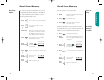
This feature determines the order in which the Phone Book
displays information. When you recall information by loca-
tion and Number Preference is ON, you will first see the stored
phone number and must press to see the associated
name. When Number Preference is OFF, the Phone Book
displays the name first and you must press to see
the associated phone number.
You will see:
1. Press then press
to enter the
menu features.
2. Press to scroll to the
Number Prefer-
ence feature.
3. Press to toggle the feature ON or OFF.
4. Press to exit the menu, or you may
scroll to other features.
Number Preference
Number
Pref On
Number
PrefOff
or
StarTac.prt 3/7/00 9:46 Page 54