
Specifications





Edit by
Name
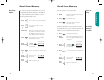
Editing a Memory Location
After you have stored names and numbers into the Phone
Book, you can edit the information or erase entries at
any time.
1. Press once to enter your name directory.
2. Press to scroll to the name you are look-
ing for.
3. Press to begin editing the phone number.
The display will show the phone
number.
4. Press to erase one digit at a time.
Press to erase the entire number.
& hold
Enter Enter your changes to the phone
numbers number.
5. Press when you finish
editing the phone
number.
6. Enter Enter the two-digit memory loca-
location tion where you want to store the
changed number. The display will
show the name stored with the
phone number you are editing.
or
Locatn
__
50 51
Using Memory
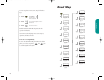
After you’ve stored your calling card information, just recall
the information, enter the number of the person you are
calling, and your phone will do the rest.
You will see:
1. Recall Recall the calling card information
you’ve stored (see page 48).
2. Press before entering
number.
3. Enter Enter the phone number you want
number to call, including the area code.
You may enter the number manu-
ally, by location, or recall.
4. Press or press
& hold to place the call.
Your phone will
dial the number to access your
long distance provider.
5. Press or press to send the next
group of numbers when the record-
ing prompts you. The phone will
automatically insert the selected
number to call at the appropriate
spot in the sequence.
6. Send Repeat step 5 to send the next
numbers group of numbers as many times
as necessary.
7. Press or close the phone to end the call.
or
Press until you hear
& hold two tones.
then
Press again to end the call.
Placing
a Calling
Card Call
Advanced Storing
Dialing
1800555
To
EndCall
Enter
Number
StarTac.prt 3/7/00 9:46 Page 50