
Specifications





48 49
Using Memory
Storing
Calling Card
Information
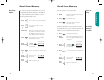
7. Press to insert the ‘N Character into the
sequence. This special character
saves a place for the phone num-
ber you will be calling. The number
will be inserted into the sequence
automatically when you place
the call.
8. Press then press
then
Press to insert another pause, as in
steps 2 and 3.
9. Enter Enter your calling card PIN number.
numbers
10. Press to store your
calling card
sequence.
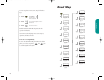
11. Enter Enter the two-
location digit memory
location where
you want the sequence stored.
12. Enter name Enter a name for your sequence.
(See page 41 for details.)
13. Press when you are finished entering
the name. Your phone will confirm
your entry by displaying the loca-
tion, number and name you stored.
Advanced Storing
Like Pause Dialing, you can store calling card access
numbers, separated by pauses, for easy recall later. You can
also store a Number Character in the sequence to save a
place for the number you will be calling when you use your
calling card.
You can protect your calling card information with your
phone’s security features. See pages 68-76 for details.
1. Enter Enter the phone number you use
numbers to access your calling card system,
usually a 1-800 phone number.
Skip this step if you only dial 0.
You will see:
2. Press then press
3. Press to insert a pause into the
sequence.
4. Enter Enter the next group of numbers.
numbers For example, some long distance
carriers require you to dial a 0
before the number you are calling.
5. Press then press
6. Press to scroll to the
Number Character.
Storing
Calling Card
Information
Advanced Storing
Insert
Pause o
Insert
Pause o
Insert
Num 'N
Locatn
__
Alpha
Or
StarTac.prt 3/7/00 9:46 Page 48