
Specifications





42 43
Using Memory
Clear an
Entry
Recall by
Memory
Location
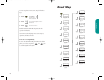
Here’s an easy way to erase a memory entry:
1. Recall Recall the entry by name that you
want to erase.
2. Press to clear the entry.
3. Press to confirm that you want to
erase the entry.
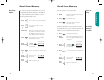
Each name and number you store is placed in a memory
location numbered 01-99. Once you have stored names and
numbers, you can recall them by memory location.
1. Press (This step is optional.)
2. Enter Enter the two-digit memory loca-
location tion of the phone number you’re
looking for.
You will see:
3. Press or press
& hold to call the number
you selected.
4. Press or close the phone to end the call.
or
Press until you hear
& hold two tones.
then
Press again to end the call.
Recall from Memory
Dialing
5551234
To
EndCall
Once you have stored names and numbers, you can recall
them alphabetically and immediately place calls. With one
press of the Smart Button you have instant access to the
name directory. What could be easier?
1. Press once to enter your name directory.
2. Press to scroll to the name you are
looking for.
or
Enter letter Enter the first letter of the name
you want to recall from memory.
The display will show the first
name beginning with that letter.
Press if you want to see the number
stored with the name.
You will see:
3. Press or press
& hold to call the number
you selected.
4. Press or close the phone to end the call.
or
Press until you hear
& hold two tones.
then
Press again to end the call.
Recall by
Name
Recall from Memory
or
Dialing
5551234
To
EndCall
StarTac.prt 3/7/00 9:46 Page 42