
Specifications

187
About CONFIG Commands
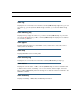
show ppp [{ stats | lcp | ipcp }]
Displays information about open PPP links. You can display a subset of the PPP statistics
by including an optional
stats, lcp, or ipcp argument for the show ppp command.
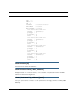
start ppp vccn
Opens a PPP link on the specified virtual circuit.
About CONFIG Commands
You reach the configuration mode of the command line interface by typing
configure
(or
any truncation of
configure
, such as
con
or
config
) at the CLI SHELL prompt.
CONFIG Mode Prompt
When you are in CONFIG mode, the CLI prompt consists of the name of the Motorola Neto-
pia® Gateway followed by your current node in the hierarchy and two right angle brackets
(>>). For example, when you enter CONFIG mode (by typing
config
at the SHELL prompt),
the Netopia-3000/9437188 (top)>> prompt reminds you that you are at the top
of the CONFIG hierarchy. If you move to the ip node in the CONFIG hierarchy (by typing ip
at the CONFIG prompt), the prompt changes to Netopia-3000/9437188 (ip)>> to
identify your current location.
Some CLI commands are not available until certain conditions are met. For example, you
must enable IP for an interface before you can enter IP settings for that interface.
Navigating the CONFIG Hierarchy
• Moving from CONFIG to SHELL — You can navigate from anywhere in the CONFIG
hierarchy back to the SHELL level by entering quit at the CONFIG prompt and pressing
R
ETURN.
Netopia-3000/9437188 (top)>> quit
Netopia-3000/9437188 >
• Moving from
top
to a subnode — You can navigate from the top node to a subnode
by entering the node name (or the significant letters of the node name) at the CONFIG