
Specifications


172
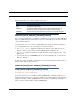
Each test generates one of the following result codes:
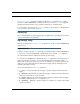
download [
server_address
] [
filename
] [confirm]
This command installs a file of configuration parameters into the Motorola Netopia® Gate-
way from a TFTP (Trivial File Transfer Protocol) server. The TFTP server must be accessible
on your Ethernet network.
You can include one or more of the following arguments with the download command. If
you omit arguments, the console prompts you for this information.
• The
server_address
argument identifies the IP address of the TFTP server from
which you want to copy the Motorola Netopia® Gateway configuration file.
• The
filename
argument identifies the path and name of the configuration file on the
TFTP server.
• If you include the optional confirm keyword, the download begins as soon as all infor-
mation is entered.
You can also download an SSL certificate file from a trusted Certification Authority (CA), on
platforms that support SSL, as follows:
download [-cert] [
server_address
] [
filename
] [confirm]
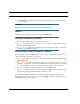
install [
server_address
] [
filename
] [confirm]
(Not supported on model 3342/3352)
Downloads a new version of the Motorola Netopia® Gateway operating software from a
TFTP (Trivial File Transfer Protocol) server, validates the software image, and programs the
image into the Motorola Netopia® Gateway memory. After you install new operating soft-
ware, you must restart the Motorola Netopia® Gateway.
CODE Description
PASS The test was successful.
FAIL The test was unsuccessful.
SKIPPED The test was skipped because a test on which it depended failed, or
because the test did not apply to your particular setup or model.
PENDING The test timed out without producing a result. Try running the test again.