
Specifications

159
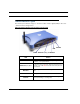
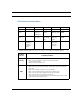
Status Indicator Lights
LED Function Summary Matrix
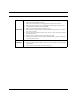
If a status indicator light does not look correct, look for these possible problems:
Power DSL Internet Ethernet Wireless
Unlit No power No signal No signal No signal No signal
Solid
Green
Power on Internet con-
nection is
established.
Router is con-
nected.
Synched with
Ethernet card
Synched with
WLAN
Flashing
Green
N/A Activity on the
DSL cable
Transmitting
or receiving
data.
Activity on the
Ethernet
cable
Activity on the
WLAN
Red Updating
embedded
software, or
for system
failure.
N/A N/A Bad userid
and pass-
word are
entered.
N/A
If LED is
not Lit
Possible problems
Power
• Make sure the power switch is in the ON position.
• Make sure the power adapter is plugged into the DSL Router properly.
• Try a known good wall outlet.
• Replace the power supply and/or unit.
DSL
• Make sure that any telephone has a microfilter installed.
• Make sure the you are using the correct cable. The DSL cable is the thinner standard tele-
phone cable.
• Make sure the DSL cable is plugged into the correct wall jack.
• Make sure the DSL cable is plugged into the DSL port on the DSL Router.
• Make sure the DSL line has been activated at the central office DSLAM.
• Make sure the DSL Router is not plugged into a micro filter.
• Launch a browser and try to browse the Internet. If the DSL Active light still does not flash,
then proceed to Advanced Troubleshooting.