
Specifications

158
Status Indicator Lights
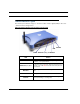
The first step in troubleshooting is to check the status indicator lights (LEDs) in the order
outlined in the following section.
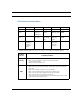
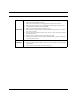
Motorola Netopia® Gateway 3347-02 status indicator lights
LED Action
Power
Green when power is on. Red when updating embedded
software, or for system failure.
Ethernet 1, 2, 3, 4
Solid green when connected. Flash green when there is
activity on the LAN. Red when bad userid and password
are entered.
Wireless
Flashes green when there is activity on the wireless
LAN.
DSL
Solid green when Internet connection is established.
Internet
Solid green when router is connected. Flashes green
when transmitting or receiving data.
Power
Wireless
DSL
Ethernet 1, 2, 3, 4
Internet