
Specifications

152
Link:
Update Router
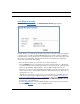
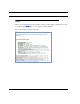
When you click Update Router, the Software Upgrade page appears.
Operating System Software is what makes your Router run and occasionally it needs to be
updated. Your Current Software Version is displayed at the top of the page.
(example screen – your screen may vary)
If you want to check for an updated version without installing it, click the
Chec
k Software from Server link.
From a Server
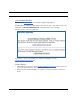
• If an updated version exists, click the Update Software from Server button, and a new
version will automatically be downloaded to your Router.
• When the download and installation is complete, you will be prompted to restart the
Router.