
User manual




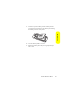
Table Of Contents
- Table of Contents
- Welcome to Sprint
- Introduction
- Your Phone’s Menu
- Getting Started
- Using Your Phone
- Phone Basics
- Controlling Your Phone’s Settings
- Setting Your Phone’s Security
- Controlling Your Roaming Experience
- Managing Call History
- Using Contacts
- Using the Phone’s Calendar and Tools
- Using Your Phone’s Voice Services
- Using the microSD Card
- Using the Built-in Camera
- Using the Built-in Media Player
- Using Bluetooth
- Sprint Service Features
- Safety and Warranty Information
- Important Safety Information
- General Precautions
- Safety and General Information
- FCC Notice To Users
- Hearing Aid Compatibility
- Battery Tips
- Specific Absorption Rate Data
- Information From the World Health Organization
- Product Registration
- Owner’s Record
- Phone Guide Proprietary Notice
- Export Law Assurances
- Wireless: The New Recyclable
- California Perchlorate Label
- Smart Practices While Driving
- Motorola’s Warranty
- Important Safety Information
- Index

24 Section 2A: Phone Basics
Removing the Battery
To remove your battery:
1. Make sure the phone is powered off.
2. Press and hold the door latch found on the top the
phone. Slide the door forward and lift it off.
3. Pull the battery up and remove it from the phone.
Charging the Battery
Your phone’s Li-Ion battery is rechargeable and should be
charged as soon as possible so you can begin using your
phone.
Keeping track of your battery’s charge is important. If your
battery level becomes too low, your phone automatically
turns off, and you will lose all the information you were just
working on. For a quick check of your phone’s battery level,
glance at the battery charge indicator located in the upper-
right corner of your phone’s display screen. If the battery
charge is getting too low, the battery icon blinks and the
phone sounds a warning tone.
WARNING!
Do not handle a damaged or leaking Li-Ion battery as
you can be burned.