
User manual




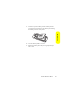
Table Of Contents
- Table of Contents
- Welcome to Sprint
- Introduction
- Your Phone’s Menu
- Getting Started
- Using Your Phone
- Phone Basics
- Controlling Your Phone’s Settings
- Setting Your Phone’s Security
- Controlling Your Roaming Experience
- Managing Call History
- Using Contacts
- Using the Phone’s Calendar and Tools
- Using Your Phone’s Voice Services
- Using the microSD Card
- Using the Built-in Camera
- Using the Built-in Media Player
- Using Bluetooth
- Sprint Service Features
- Safety and Warranty Information
- Important Safety Information
- General Precautions
- Safety and General Information
- FCC Notice To Users
- Hearing Aid Compatibility
- Battery Tips
- Specific Absorption Rate Data
- Information From the World Health Organization
- Product Registration
- Owner’s Record
- Phone Guide Proprietary Notice
- Export Law Assurances
- Wireless: The New Recyclable
- California Perchlorate Label
- Smart Practices While Driving
- Motorola’s Warranty
- Important Safety Information
- Index

22 Section 2A: Phone Basics
Battery Use and Maintenance
䢇 Sprint-approved or Motorola-approved Li-Ion chargers
provide optimum performance. Other chargers may not
fully charge the Li-Ion battery or may yield a reduced
number of lifetime charge cycles.
䢇 Extreme temperatures degrade battery performance. Do
not store the battery where temperatures exceed 140°F
(60°C) or fall below -4°F (-20°C).
䢇 Li-Ion batteries have a self-discharge rate and, without
use, lose about 1% of their charge per day.
Installing the Battery
To install the Li-Ion battery:
1. Make sure the phone is powered off.
2. Press and hold the door latch found on the top the
phone. Slide the door forward and lift it off.