
User manual






15
essentials
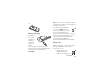
To use voice commands for calling, see
page 37.
your phone number
From the home screen, press
the clear key
D
then
#
to see your
number.
Tip:
Want to see your phone number while
you’re on a call? Press
Options
>
My Tel. Number
.
You can edit the name and phone
number stored on your SIM card. From
the home screen, press
D#
, select an
entry, press the
View
key, press the
Options
key,
and select
Edit
. If you don’t know your phone
number, contact your service provider.