
User manual






13
essentials
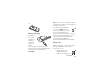
To t u r n o n y o u r
phone
, press and
hold
u
for a few
seconds or until the
keypad or display
lights up. If prompted, enter your eight-digit
SIM card PIN code and/or four-digit unlock
code.
To turn off your phone
, press and hold
u
for a few seconds.
make a call
To make a call
, enter a phone number and
press
U
.
To “hang up,”
close the flip or
press
u
.
To use voice commands for calling, see
page 37.
answer a call
To answer a call
when your phone rings
and/or vibrates, just open the flip or press
U
.
To “hang up,”
close the flip or press
u
.
Note:
Your phone cannot receive data
over an EDGE network while it is
playing videos or some sound files. The
EDGE
,
status indicator appears at the top of
your display when you can receive data over
an EDGE network.
store a phone number
You can store a phone number in your
Phonebook
:
Find it:
s
>
n Phonebook
, then press
Options
>
Create New
>
Phone Contact
or
SIM Contact
Note:
You can store new contacts in your
phone’s memory
or on your
SIM card
.